Partitioning of MI300A GPU resources
The AMD MI300A APU allows its physical GPU compute resources to be divided into multiple logical devices, enabling more flexible workload scheduling and resource allocation. The MI300A contains six Accelerator Complex Dies (XCDs), each housing 38 CDNA3 Compute Units (CUs), for a total of 228 CUs per socket (note that a Viper-GPU node has two sockets). These XCDs can be grouped into partitions in three ways. In SPX (Single Partition X-celerator) mode — the default — all six XCDs are presented to the system as a single monolithic GPU with 228 CUs and access to the full 128 GB of unified HBM3 memory. This is optimal for large workloads such as full-scale HPC simulations or deep-learning training runs that benefit from the highest possible compute throughput and memory capacity. In TPX (Triple Partition X-celerator) mode, the six XCDs are grouped into three logical devices of two XCDs each; this offers a middle ground between unified execution and fine-grained partitioning, although most workloads benefit more from either SPX or CPX mode. In CPX (Core Partitioned X-celerator) mode, each of the six XCDs is exposed as an independent logical GPU device, yielding six separate devices per socket, each with 38 CUs and approximately 21 GB of HBM.
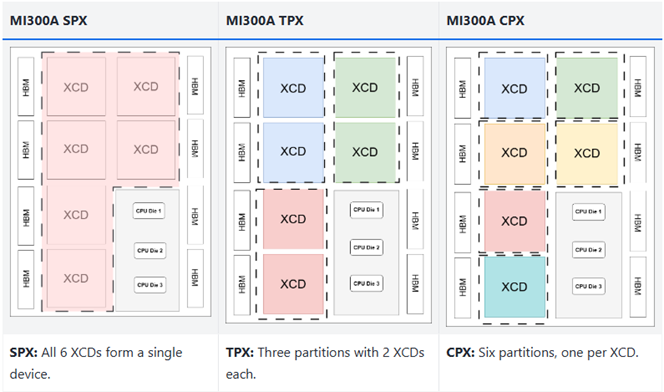
The partitioning mode can be reconfigured dynamically via Slurm using the
--mi300-partition=MODE option of sbatch, salloc, or srun, where MODE
is tpx or cpx. Alternatively, the option can be set in the batch
script:
#SBATCH --mi300-partition=cpx # AMD MI300 compute partition: tpx|cpx
On the Viper-GPU apu Slurm partition, where nodes are allocated exclusively,
this sets the partitioning mode on both MI300A APUs. For code testing, a single
APU can also be partitioned in the apudev Slurm partition. When the option is
used, the ROCR_VISIBLE_DEVICES and HIP_VISIBLE_DEVICES environment variables
are set accordingly. When the APUs are reconfigured via sbatch or salloc,
there is no need to repeat the option on srun for individual job steps, since
the APUs are already divided into multiple logical devices.
The selected partitioning mode directly affects both job placement and GPU kernel scheduling, and therefore application performance. SPX mode is best suited to workloads that can efficiently utilize the full GPU. CPX mode, in contrast, benefits applications that do not require the full memory capacity and can exploit additional parallelism, for example by running one MPI rank per XCD partition. Stencil codes are a typical example of this class of applications, and the HPC community has observed significant speedups when running them in CPX mode compared to SPX (see this study). Readers interested in the underlying architecture and partitioning concepts are encouraged to consult the official AMD Instinct MI300A APU Overview documentation.